
gSvvvvitcher
tool
Credits: tomfilm
the original: http://vvvv.org/contribution/svvvvitcher
about
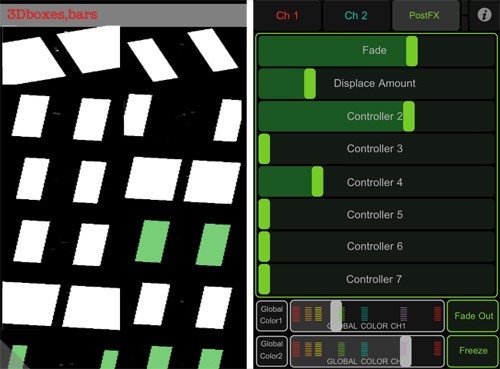
This is the wonderful SvvvvitcherV1 customized for controlling Svvvvitcher remotely with i-devices. It also adds some features to the original SvvvvitcherV1 that are only accessible via the TouchOSC interface.
Features:
- My latest TouchOSC Svvvvitcher integration to mess with the sliders, plus a Freeze, Global Color and Fade in/out feature.
- My latest Fantastick Svvvvitcher integration to chose presets.
- A new PostFX called zoom
Installation:
- Download & Extract the zip
- Get these apps for your i-device: Fantastick, TouchOSC
- Download the TouchOSC editor from the TouchOSC website and use it to upload the included osc\gSvvvvitcher.touchosc layout to your idevice.
- Open _root_MAIN.v4p
- Set the IP addresses and ports for TouchOSC and Fantastick
- Setup the IP address and ports on your i-device for each app (for Fantastick goto iOS Settings)
NOTE: To upgrade your existing patches to be fully compatible with this package, add an color IO box node to all of your patches named "Global Color". If you don't it will break the global color TouchOSC feature. (Look at any of the included _root patches in the Patches subfolder to see what I'm talking about)
Fantastick: If you create new presets, press the volume button on your idevice to reload. If you change an existing preset press the 'Fanta: Clear Image Cache' bang in _root_MAIN then click the volume button to reload.
TouchOSC: For utilizing the Global Color feature, there is a node called gColorIsNIL in the gui folder that can help you create a switch statement. You don't have to use this feature, it's just convenient. However, all your patches MUST have a "Global Color" color IO box otherwise it will break this feature for all your patches. Also keep in mind that when saving a preset global color is ignored (which is what you'd expect).
Issues with Fantastick:
- Once you switch to a preset with Fantastick, the preset buttons will act funny on the computer. To switch back to changing presets on the computer you must click a preset, until then it will not work properly. However, I recommend clicking the Disable Presets button in _root_MAIN and it will boost performance a little bit. Then use only Fantastick to switch presets.
- Crashes too much
- Doesn't always load, in which case press the volume button it acts as a sort of reload.
download
anonymous user login

Shoutbox
~2yr ago
~2yr ago
~2yr ago
~2yr ago
~2yr ago
~2yr ago
~2yr ago
~2yr ago
~2yr ago
~2yr ago